Browsed by
Category: E-Portfolio

Why a Learning Portfolio?

Why a Learning Portfolio?

The idea of collecting and displaying your best work is not new – you were doing it with pictures you drew in Junior School – but the idea of having your OWN online space to do the same thing IS new.

Using this platform you can create, curate and show off your learning, adding samples in a variety of formats – photos, movies, links, text – and mix it up YOUR way. This is your space to get creative to show off your work.

Here is one take on why ePortfolio’s are a must for modern learners.
https://youtu.be/YvxFngIJXlk

Read Before You Start!

Read Before You Start!

By uploading files to a learning portfolio site to share with others, students are declaring that the content is original and that they have permission to reproduce copyright material, such as authentic texts or images.

Plagiarism is the unacknowledged use of someone’s work as one’s own in all forms of academic endeavor (such as essays, theses, research data, creative projects, etc.) which may be derived from a variety of sources (such as books, journals, Internet postings, student or faculty papers, etc.) Plagiarism on any assignment will result in a failing grade and will be automatically referred to the Dean’s office.


Finding Your Way Around the Learning Portfolio

Finding Your Way Around the Learning Portfolio

Get to know the layout of the learning portfolio.

Theme
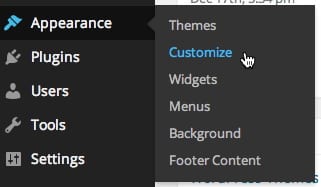
You may personalize theme by changing the site title, the tagline and the background color. You may also add a background image to the page and an image logo to the title bar.

Personalize Tetris via the Appearance Tab of the Dashboard

Homepage
This is what the homepage of a new learning portfolio looks like.

  1. The Site Title is where you put your name. It is also a link to the homepage of your learning portfolio.
  2. The Menu Items are critical for you and others to easily navigate the contents of your portfolio.
    • Artifacts brings you back to the front page of your learning portfolio and will show all of your posts in chronological order.
    • About links to a page where you can put some information about yourself.
    • Courses provides a means of linking each artifact to the specific course where it was generated.
    • Statement is a synthesizing document of approximately 2500 words describing and evaluating your learning trajectory in the program. Be sure to read the entire text under Statement on the menu.
    • Help links to lots of instructions and tutorial on building and managing your learning portfolio.
  3. The Tagline lets the visitor know what kind of web site this is.
  4. Your Recent Posts will appear in this section with the most recent post in the upper left. You can set the maximum number of post to appear via Settings>Readings in the Dashboard. The default number is 10.
  5. The Footer contains additional tools for navigating the portfolio.
    • Post Categories is a pull-down menu from which you can select any category that has been used. Doing so will aggregate all posts that have been assigned a particular category. This is similar to the Courses menu, but you might create new categories that are not course-specific. All of your categories currently in use will appear here.
    • Search is just what you’d expect.
    • Tags is a list of tags currently in use. These will appear each time you tag an artifact.  Clicking on any one of them will aggregate all posts that have been assigned that particular tag.
    • Links are automatically placed here whenever you create them.
The Importance of Categories and Tags

The Importance of Categories and Tags

Tags and categories are means of linking, aggregating and presenting related content in your portfolio. You can create new ones at any time.

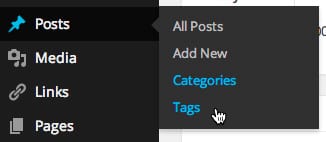
Categories and Tags in the Dashboard

Whenever you upload an artifact, be sure to add relevant categories and tags that link it both to the specific course that it relates to, and to other artifacts that share a common theme or focus.

Welcome to Our Learning Portfolio!

Welcome to Our Learning Portfolio!

The Learning Portfolio is where you will tell your All Saints’ story.

The focus of the Learning Portfolio is on reflection, on looking across your subjects and semesters and the various tasks and assignments throughout your school life. By means of the portfolio you will manage and track your growth as a learner over the course of years. The portfolio will also offer evidence of your achievement and your progress on personal goals.